


Blog
The Executive Hybrid Workspace: Bringing Corporate-Grade Ergonomics to the Home Office

Jun
The New Frontier of Executive Work
The corner office is no longer defined by its location inside a corporate tower. Today, the world’s most effective executives, senior managers, and high-performance professionals are carving out command centers within their own homes and the standards they demand are anything but ordinary. The executive hybrid workspace is not simply a desk pushed into a spare bedroom. It is a meticulously engineered environment that mirrors and in many ways surpasses what the most forward-thinking corporate campuses offer.
Across the UAE and the broader Middle East, the shift to hybrid working has accelerated dramatically. According to a 2024 Microsoft Work Trend Index report, over 68% of knowledge workers in the MENA region now operate in a hybrid model, spending at least two to three days per week working remotely. For C-suite executives, department heads, and senior consultants, this creates a clear mandate: the home office must perform at the same level as the corporate office ergonomically, technologically, and aesthetically.
At OfficeMaster.ae, we have spent years helping businesses and professionals across Dubai and the UAE source, design, and install workspaces that drive productivity, protect health, and project professionalism. In this comprehensive guide, we explore everything you need to know about building an executive hybrid workspace with true corporate-grade ergonomics from choosing the right office furniture to managing acoustics, lighting, and technology integration.
When planning your executive hybrid workspace, treat it with the same seriousness as a capital investment. The furniture, equipment, and layout choices you make today will directly affect your cognitive performance, physical health, and professional reputation for years to come.

1. Understanding the Executive Hybrid Workspace Concept
The phrase ‘hybrid workspace’ has become one of the most frequently used and frequently misunderstood terms in the post-pandemic professional lexicon. For clarity, a hybrid workspace refers to a professional environment designed to support seamless transitions between on-site and remote work, without any compromise in productivity or presentation.
An executive hybrid workspace takes this a step further. It is purpose-built to meet the unique demands of senior professionals who conduct high-stakes video calls, manage cross-functional teams, process large volumes of data, and require an environment that communicates authority and capability to every stakeholder who sees it whether in person or through a camera lens.
What Separates an Executive Hybrid Workspace from a Standard Home Office?
| Feature | Standard Home Office | Executive Hybrid Workspace |
|---|---|---|
| Desk | Basic fixed-height table | Height-adjustable motorized executive desk (180cm+) |
| Chair | Consumer-grade chair | Commercial-grade ergonomic executive chair with lumbar, headrest & armrest adjustment |
| Monitor Setup | Single laptop screen | Dual or triple 27″+ monitors on articulating arms |
| Lighting | Overhead room light | Layered: ambient + task + bias lighting, video call optimized |
| Acoustics | Untreated room | Acoustic panels, soft furnishings, noise-cancelling hardware |
| Cable Management | Visible cable clutter | Integrated cable trays, desk grommets, power modules |
| Storage | Generic shelves/drawers | Executive credenza, lockable pedestal, display shelving |
| Technology | Basic webcam, laptop audio | 4K webcam, studio microphone, USB-C docking station, AV integration |
| Branding/Aesthetics | Incidental | Intentional: curated background, brand-aligned color palette |
Research from the Human Factors and Ergonomics Society shows that poorly designed workspace cost organizations an average of 17 lost working days per employee per year due to musculoskeletal discomfort and fatigue. For executives managing high-value decisions daily, this cost is exponentially higher in both health and business terms.
2. The Ergonomic Imperative: Why Corporate Standards Matter at Home
Corporate offices invest heavily in ergonomics for a simple reason: it works. Studies consistently show that ergonomically optimized workstations reduce musculoskeletal disorders by up to 59%, decrease absenteeism, and improve task performance by measurable margins. When professionals transition to hybrid working, these benefits do not automatically transfer in fact, they often evaporate entirely as individuals work from unsuitable kitchen chairs, improvised standing surfaces, and poorly lit rooms.
For the executive hybrid workspace, the ergonomic standard must be non-negotiable. The body does not distinguish between a home office and a corporate one it responds to posture, load, movement patterns, and visual ergonomics in exactly the same way, regardless of geography.
The Five Pillars of Corporate-Grade Ergonomics
- Postural Support: The chair and desk must collectively maintain the spine’s natural curves — lordotic lumbar, neutral thoracic, relaxed cervical — throughout extended working sessions.
- Visual Ergonomics: Monitor height, distance, angle, and ambient lighting must eliminate eye strain, glare, and neck flexion that lead to chronic headaches and fatigue.
- Upper Extremity Ergonomics: Keyboard and mouse positioning, armrest height, and wrist angle must prevent repetitive strain injuries (RSI) such as carpal tunnel syndrome and epicondylitis.
- Movement Integration: No ergonomic setup is complete without mechanisms that encourage regular posture transitions — standing, seated, and movement breaks structured into the work day.
- Environmental Control: Temperature, air quality, acoustic comfort, and lighting intensity are environmental ergonomic factors that significantly impact cognitive performance and stress levels.
Invest in a professional ergonomic assessment for your home office setup. Many UAE-based occupational health consultants now offer remote assessments via video call, and the investment typically pays for itself within the first quarter through improved output and reduced discomfort.
3. Choosing the Right Executive Desk: The Command Center Foundation
The executive desk is the architectural centerpiece of your hybrid workspace. Everything your monitors, your technology stack, your storage, your presentation posture orbits around it. For corporate-grade performance, the desk must meet several demanding criteria simultaneously.
Height-Adjustable (Sit-Stand) Executive Desks
The single most impactful upgrade any home-based executive can make is transitioning from a fixed-height desk to a motorized height-adjustable executive desk. The science is unambiguous: prolonged sitting is associated with increased cardiovascular risk, metabolic dysfunction, and musculoskeletal deterioration. Standing desks that allow fluid transitions between seated and standing positions demonstrably reduce these risks.
At OfficeMaster.ae, our premium height-adjustable executive desks feature whisper-quiet dual-motor mechanisms capable of transitioning the full desktop surface including mounted monitors, docking stations, and peripherals from seated height (approximately 68–75cm) to standing height (up to 128cm) in under 30 seconds. Memory presets allow executives to recall their preferred positions instantly.
Executive Desk Specification Comparison Table
| Specification | Entry Level | Mid-Range | Executive Grade |
|---|---|---|---|
| Desktop Size | 120 × 60 cm | 160 × 80 cm | 180–200 × 90 cm |
| Height Range | 70–110 cm (manual) | 68–120 cm (electric) | 60–128 cm (dual-motor) |
| Load Capacity | Up to 50 kg | Up to 80 kg | 100–150 kg |
| Surface Material | MDF laminate | Premium MDF / veneer | Solid wood / executive veneer / tempered glass |
| Cable Management | None | Basic grommet | Integrated tray + grommet + power module |
| Noise Level | N/A | < 50 dB | < 40 dB (whisper-quiet) |
| Memory Presets | None | 2 positions | 4+ positions with LCD |
| Warranty | 1 year | 2–3 years | 5+ years commercial grade |
| Anti-Collision | No | Basic | Advanced sensor system |
A 180 × 90 cm desk surface is the minimum recommended footprint for an executive dual-monitor setup with adequate document workspace. Anything smaller forces compromises in monitor positioning that directly increase neck and eye strain over time.
Beyond dimensions and mechanics, the executive desk must integrate seamlessly with your technology ecosystem. Look for desks equipped with built-in USB-A and USB-C charging ports, wireless charging pads embedded into the desktop surface, integrated power modules with surge protection, and concealed cable management trays that route all cabling invisibly to floor-level cable raceways. These features are standard in all premium office furniture Dubai procurement specifications and should be the baseline for your home executive setup as well.
4. The Executive Ergonomic Chair: Where Performance Meets Physiology
No single piece of office furniture has a greater direct impact on your daily comfort, physical health, and cognitive performance than your chair. The disparity between a consumer-grade chair purchased from a general retailer and a commercial-grade executive ergonomic chair is vast and in the context of an executive who may spend six to nine hours per day seated, that disparity translates directly into health outcomes and work quality.
What Defines a Corporate-Grade Executive Chair?
Corporate-grade executive chairs are engineered to specifications that consumer products simply do not match. They are tested to BIFMA (Business and Institutional Furniture Manufacturers Association) standards, which mandate structural integrity under continuous use loads far exceeding what residential products endure. They are designed by ergonomic engineers rather than product designers, with adjust-ability ranges calibrated to the anthropocentric diversity of a professional workforce.
| Feature | Why It Matters for Executives |
|---|---|
| Adjustable Lumbar Support | Maintains the natural lumbar curve, preventing the posterior pelvic tilt that causes lower back pain during extended sessions. |
| Seat Depth Adjustment | Accommodates varying leg lengths; prevents popliteal pressure that restricts circulation. |
| 4D Armrests | Height, width, depth, and pivot adjustment allows a neutral shoulder position, eliminating neck and trapezius tension. |
| Headrest / Neck Rest | Critical for executives on extended video calls who need a relaxed cervical spine position. |
| Recline with Tension Control | Dynamic recline distributes spinal loading and reduces lumbar disc pressure by up to 40% versus upright sitting. |
| Seat Tilt & Waterfall Front | Reduces popliteal pressure, encourages micro-movement, and maintains healthy thigh circulation. |
| Breathable Mesh Back | Regulates thermal comfort during long work sessions and reduces moisture build-up that can impair concentration. |
| Heavy-Duty Caster Wheels | Hard-floor or carpet-specific casters help prevent musculoskeletal strain caused by reaching, twisting, or overextending. |
When selecting an executive ergonomic chair, always insist on a physical trial before purchase. Spend a minimum of 20 minutes seated, adjusting every parameter while simulating your typical working postures — typing, reading, video calling, and reviewing documents. At OfficeMaster.ae, we offer in-showroom trials for all our premium chair ranges in Dubai.

5. Monitor Setup and Visual Ergonomics for the Executive Workspace
The visual workstation comprising your monitors, their positioning, ambient lighting, and display settings is one of the most frequently neglected aspects of home office ergonomics. Yet visual fatigue (asthenopia) is among the leading causes of reduced productivity and end-of-day cognitive exhaustion for desk-based professionals.
Dual Monitor vs. Ultra-wide vs. Triple Monitor: Which Is Right for You?
| Configuration | Best For | Key Consideration |
|---|---|---|
| Single 27″ 4K | Focused writing, code review, minimal multitasking | Best image quality per screen; limited real estate for multi-document work |
| Dual 27″ QHD | Finance, operations, legal, project management | Industry standard for executive hybrid setups; excellent multitasking capacity |
| 34–49″ Ultra-wide Curved | Creative directors, data analysts, traders | Immersive; eliminates bezel gap; requires wider desk (min. 160cm) |
| Triple 27″ (portrait-landscape-portrait) | Power users, video producers, control room-style work | Maximum real estate; requires premium desk depth and articulating arm system |
Regardless of configuration, monitor arms are non-negotiable for an executive workspace. Fixed monitor stands occupy desk surface real estate, offer virtually no positioning flexibility, and create a static visual ergonomics situation that cannot adapt to your posture variations throughout the day. Premium monitor arms whether single, dual, or integrated into an executive desk-mounted rail system allow infinite height, tilt, swivel, and depth adjustment, and clear valuable desktop space beneath them for documents, accessories, and technology.
The ergonomically correct monitor position places the top of the screen at or slightly below eye level, at arm’s length distance from your face. For dual-monitor users who split attention equally between two screens, positioning both slightly inward — angled approximately 15–20 degrees toward center — reduces cumulative neck rotation and associated trapezius tension significantly.
6. Lighting Design for the Executive Home Office
Lighting in the executive hybrid workspace serves three distinct functions: physiological well-being (circadian rhythm support and eye strain prevention), visual task performance (adequate and appropriate illumination for reading, screen work, and writing), and video conferencing presentation (controlled, flattering, professional illumination for on-camera appearance).
The Three-Layer Lighting Strategy
- Ambient Lighting: The base layer. Provides uniform, glare-free illumination across the room. Target: 300–500 lux at desk level with a color temperature of 4,000K (cool white) for daylight hours, transitioning to 3,000K (warm white) in afternoon and evening sessions.
- Task Lighting: Directed illumination for detailed work. A premium articulating LED desk lamp with adjustable color temperature and brightness — positioned to the left (for right-handed users) to eliminate shadow on the work surface — reduces eye strain by up to 40% compared to ambient-only illumination.
- Bias Lighting: Often overlooked but particularly important for executives using large monitors. LED bias lighting mounted behind the monitor reduces the contrast ratio between the bright screen and the dark surrounding wall, significantly reducing visual fatigue during extended screen sessions.
Video Call Lighting: A Non-Negotiable Executive Standard
Your video call lighting is your visual handshake. In a world where executive presence is increasingly assessed through a 1080p or 4K camera lens, poor lighting is not merely aesthetically sub-optimal — it is a professional statement. The gold standard for executive video call lighting is a three-point system: a key light (primary illumination, positioned 45 degrees to the side and slightly above face level), a fill light (softer, from the opposing side to reduce shadows), and a separation or hair light (from behind and above, creating dimensional depth and preventing you from appearing flat against the background).
If a full three-point lighting rig feels excessive, a single premium ring light or LED panel positioned directly behind your camera at face level delivers an immediately professional upgrade. Look for panels with adjustable color temperature (2700K–6500K) and CRI above 95 for accurate, flattering skin tone rendition on camera.
7. Acoustic Management: The Overlooked Executive Advantage
Sound is the most underestimated dimension of executive workspace design. A visually perfect home office that echoes, leaks ambient household noise into video calls, or fails to acoustically separate the professional from the domestic environment will undermine credibility, concentration, and communication quality in ways that no premium desk or chair can compensate for.
Acoustic Treatment Strategies for the Executive Home Office
| Problem | Solution | Effectiveness |
|---|---|---|
| Room echo/reverberation | Acoustic wall panels (60–70% wall coverage), rugs, upholstered furniture | High — reduces RT60 (reverberation time) by 40–70% |
| External noise intrusion | Solid-core door, acoustic door seals, double-glazed window film, mass-loaded vinyl | Medium-High — reduces airborne noise by 15–25 dB |
| HVAC/mechanical noise | Acoustic duct lining, vibration isolation mounts for equipment | Medium — requires professional assessment |
| Keyboard and desk noise | Desk mat, silent keyboard switches, mouse pad | Low-Medium — reduces transient noise on microphone |
| Microphone pickup of room noise | Directional condenser or dynamic microphone, acoustic shield | High — dramatically improves call audio quality |
For executives conducting confidential client calls, board meetings, or HR conversations from home, acoustic privacy is a compliance and confidentiality matter, not merely a comfort one. A professional acoustic assessment of your home office space is a worthwhile investment if your conversations involve commercially sensitive information.

8. Technology Integration: Building the Corporate Infrastructure at Home
The executive hybrid workspace must replicate the technology infrastructure of a corporate office — often exceeding it in terms of reliability and integration, since the executive working from home does not have an IT department available for immediate on-site support.
Core Technology Checklist for the Executive Home Office
- USB-C Docking Station: A single cable connection that powers your laptop, drives multiple monitors, and routes all peripherals. Look for Thunderbolt 4 compatibility, 96W+ laptop charging, and 2.5Gbps Ethernet.
- Business-Grade Webcam: 4K resolution with optical zoom and a wide-angle lens (90+ degrees field of view). Sony STARVIS sensor technology performs significantly better in variable lighting conditions.
- Studio-Quality Microphone: A directional condenser microphone on a pneumatic arm mount eliminates the muffled, echo-prone audio of built-in laptop microphones. This is one of the highest-ROI investments for executive credibility on calls.
- Network: Dedicated Gigabit Ethernet connection from your router to your workspace. If cabling is not feasible, a premium Wi-Fi 6E access point positioned within your office space eliminates the latency and dropout issues that afflict wireless video conferencing.
- Uninterruptible Power Supply (UPS): A 1500VA UPS provides enough backup power to conclude a critical video call or save critical work in the event of a UAE power interruption — which, while rare, can occur during peak summer demand periods.
- KVM Switch: For executives managing multiple machines (corporate laptop, personal computer, and/or tablet), a KVM switch allows instant switching between devices using the same keyboard, mouse, and monitor setup.
Invest in a business-grade router with Quality of Service (QoS) settings configured to priorities video conferencing traffic. Platforms like Cisco Meraki and Ubiquiti offer enterprise-grade wireless solutions designed specifically for hybrid professionals who need corporate-quality connectivity at home.

9. Storage, Organization, and Executive Workspace Aesthetics
The executive workspace is not merely a functional environment it is a statement of professional identity. Every video call background, every client visit to a home office, and every photograph shared across professional networks communicates your standards, your attention to detail, and your relationship with your work. Storage and aesthetics are therefore not ancillary concerns; they are integral to the executive workspace proposition.
Recommended Storage Solutions for the Executive Home Office
- Executive Credenza: A low-profile, lockable storage unit positioned behind the desk provides both secure document storage and an elevated surface for reference materials, awards, or branded accessories visible in video calls.
- Mobile Pedestal: A lockable three-drawer pedestal positioned beneath or beside the desk provides immediate-access storage for frequently used documents, stationery, and personal items, keeping the desktop clear.
- Display Shelving: Open shelving flanking the workspace allows curated display of books, industry references, awards, and accessories — creating a professional, personality-rich video call background that communicates authority without clutter.
- Filing Cabinet: For executives managing physical document volumes, a commercial-grade lateral filing cabinet with full-extension drawers and key lock provides organized, accessible, and secure document management.
Aesthetic Principles for the Executive Home Office
The most effective executive home office aesthetics follow a principle of intentional restraint every object in the space serves either a functional purpose or a deliberate aesthetic one. Color psychology matters: deep navy, charcoal, warm walnut tones, and cooler greys project authority and focus. Accents of brass, chrome, or matte black hardware elevate the material quality of the space. The background visible during video calls should be clean, aspirational, and personally authentic a curated bookshelf, a tasteful piece of art, or a sophisticated architectural feature.
Leading executive coaches now recommend that senior professionals conduct a quarterly “video call background audit” — reviewing the visual impression their workspace creates during calls and making deliberate adjustments. In a hybrid world, your workspace background is as much a part of your personal brand as your attire or communication style.
10. Health and Well-being Integration in the Executive Hybrid Workspace
The most forward-thinking corporate offices in the world now integrate active health promotion directly into workspace design — and the executive hybrid workspace should do the same. This goes beyond ergonomics (preventing harm) to encompass active wellness features that enhance performance, resilience, and longevity.
Well-being Features Worth Integrating
| Feature | Benefit | Implementation |
|---|---|---|
| Standing Desk Protocol | Reduces cardiovascular risk, boosts afternoon energy | Alternate 30 min sit / 30 min stand throughout the day using desk memory presets |
| Desk Treadmill or Balance Board | Adds light movement during lower-intensity tasks | Position beneath desk; use during calls or reading tasks |
| Air Quality Monitor | CO2 levels above 1,000 ppm measurably reduce cognitive performance | Devices like Aranet4 provide real-time CO2, humidity, and temperature readings |
| Circadian Lighting Controller | Aligns light color temperature with biological clock | Smart lighting system (Philips Hue, LIFX) programmed to shift from 6500K morning to 2700K evening |
| Noise-Cancelling Headphones | Reduces cognitive load from ambient noise during focused work | Premium over-ear ANC headphones (Sony XM5 / Bose QC45) for deep work sessions |
| Micro-Break Reminder System | Prevents cumulative strain from uninterrupted sitting | Software tools (Stretchly, Time Out, or Apple Health Screen Distance) |
Install a CO2 monitor in your home office. Studies by Harvard’s T.H. Chan School of Public Health found that occupants in high-CO2 environments (above 1,000 ppm — easily reached in a sealed home office room) scored significantly lower on cognitive function tests. Ventilating your space for 10 minutes every 90 minutes helps restore optimal cognitive performance and maintain mental clarity throughout the workday.

11. The OfficeMaster.ae Advantage: Corporate-Grade Office Furniture Dubai & Beyond
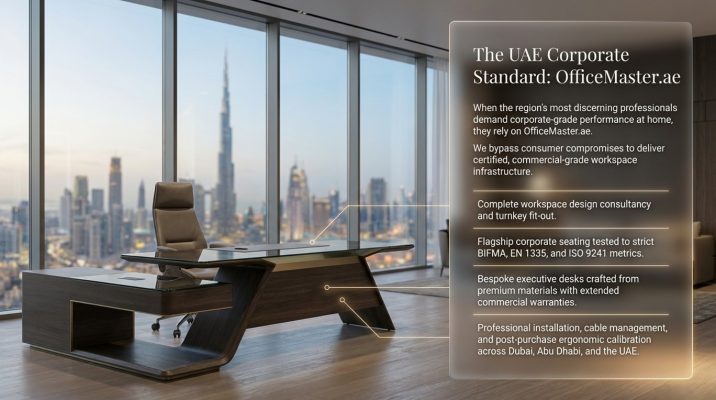
When executives across Dubai, Abu Dhabi, and the wider UAE decide to invest in a professional hybrid workspace, OfficeMaster.ae stands as the region’s most comprehensive and trusted source for corporate-grade workspace solutions. Our portfolio spans executive height-adjustable desks, premium ergonomic seating, acoustic furniture solutions, monitor arms and technology accessories, executive storage systems, and complete workspace design consultancy all curated to the standards demanded by the region’s most discerning professionals.
Our office furniture Dubai collection encompasses the full spectrum of executive workspace requirements: from flagship brands in the ergonomic seating category to bespoke executive desk solutions crafted in premium materials including solid walnut, oxidised oak, and smoked glass. Every product we offer is selected based on rigorous quality criteria, warranty commitment, and ergonomic certification so that when you invest in your workspace through OfficeMaster.ae, you are making a decision aligned with both your professional ambitions and your physical well-being.
Why OfficeMaster.ae?
- UAE-based showroom in Dubai — try before you invest, with expert consultants guiding your selection.
- Commercial-grade product range tested to BIFMA, EN 1335, and ISO 9241 standards.
- Workspace design consultancy — from space planning to complete turnkey fit-out.
- Professional delivery, assembly, and installation across the UAE.
- Post-purchase ergonomic setup guidance to maximize the performance of every product.
- Extended commercial warranties on all furniture and accessories.
12. Investment Guide: Budgeting for the Executive Hybrid Workspace
| Component | Entry Investment (AED) | Executive Grade (AED) | Notes |
|---|---|---|---|
| Height-Adjustable Desk | 2,500–4,500 | 8,000–18,000 | Dual motor, solid surface, 180 × 90 cm+ |
| Executive Ergonomic Chair | 1,800–3,500 | 6,000–14,000 | BIFMA-certified, full 4D adjustment |
| Monitor Arms (Dual) | 400–800 | 1,500–3,500 | Gas spring, cable management integrated |
| Monitors (x2) | 1,600–3,200 | 4,000–10,000 | 27″ QHD to 32″ 4K executive spec |
| Docking Station | 400–700 | 1,200–2,500 | Thunderbolt 4, multi-monitor output |
| Webcam & Microphone | 500–1,000 | 2,000–5,000 | 4K optics, studio-grade audio |
| Lighting (Full Setup) | 300–600 | 2,000–6,000 | Circadian-smart + video call optimized |
| Acoustic Treatment | 500–1,500 | 4,000–12,000 | Full-room treatment vs. panel-only |
| Storage Solutions | 800–1,500 | 3,000–8,000 | Credenza + pedestal + display shelving |
| Miscellaneous Accessories | 500–1,000 | 2,000–4,000 | Cable management, desk mat, UPS, etc. |
| TOTAL INVESTMENT | 9,300–18,300 AED | 33,700–83,000 AED | ROI realized within 6–18 months |
McKinsey Global Institute estimates that knowledge worker productivity improvements of even 5–10% generate annual value equivalent to several multiples of the workspace investment cost. For a senior executive managing an AED 20M+ annual revenue portfolio, a AED 50,000 workspace investment that delivers a 5% productivity improvement can effectively pay for itself within its first month through enhanced decision-making capacity and output.
Frequently Asked Questions (FAQ)
An executive hybrid workspace is a purpose-engineered professional environment built to corporate quality standards within a home setting. Unlike a basic home office — which typically involves a consumer desk and chair — an executive hybrid workspace incorporates height-adjustable furniture, commercial-grade ergonomic seating, multi-monitor setups, professional-grade audio/video technology, acoustic treatment, and intentional aesthetic design. It is built to support a senior professional’s full spectrum of work activities — deep focus work, high-stakes video conferencing, document management, and team leadership — at performance levels equivalent to or exceeding the corporate office.
While all elements of an ergonomic workspace interact with each other, the executive chair consistently delivers the highest ergonomic impact per dollar invested. An incorrectly designed or ill-fitting chair causes cumulative musculoskeletal damage that no other product can fully compensate for. However, the height-adjustable desk comes as a close and essential complement — because even the best chair cannot counteract the metabolic and musculoskeletal effects of prolonged, uninterrupted sitting.
Priorities chairs with full lumbar adjust ability (both height and depth of lumbar support), 4D armrests, adjustable seat depth, and a quality breathable mesh back. Given Dubai’s climate, mesh backs with high airflow properties are particularly important for thermal comfort during long working sessions. Always test the chair for a minimum of 20 minutes before purchase, and ensure the supplier offers a trial or return period. OfficeMaster.ae Dubai showroom provides extended trial sessions for all premium ergonomic chair models.
For a dual 27″ monitor setup with monitor arms, a minimum desk surface of 160 x 80 cm is required. For a more comfortable executive standard — accommodating monitors, a laptop, docking station, and adequate document workspace — a 180 x 90 cm desk is the recommended minimum. For ultra-wide curved monitor configurations, a 200 x 90 cm surface is ideal.
Unequivocally yes, particularly for executives spending six or more hours at their workstation daily. Clinical evidence consistently links excessive sitting with increased risk of cardiovascular disease, type 2 diabetes, and lower back disorders. Sit-stand desks reduce these risks, improve afternoon energy levels, and — when combined with appropriate standing mat usage — create a more dynamic, healthier work pattern. The return on investment from improved health outcomes and sustained productivity typically exceeds the cost within the first year.
The most effective acoustic interventions, ranked by impact, are:
(1) soft furnishings — rugs, curtains, and upholstered seating absorb mid and high frequencies dramatically;
(2) acoustic wall panels positioned at first-reflection points;
(3) solid-core door with acoustic door seals;
(4) a directional microphone positioned close to the mouth rather than the built-in laptop microphone;
(5) noise-cancelling headphones with good microphone isolation for the call recipient. For severe acoustic challenges, a professional acoustic consultant can identify specific interventions for your room’s dimensions and surface materials.
The optimal video call lighting for executives is a three-point setup: a key light at 45 degrees to the camera at face level (providing primary, flattering illumination), a fill light at lower intensity from the opposite side (softening shadows), and a hair/separation light from behind and above (providing depth and preventing flat, two-dimensional appearance on screen). If a full three-point setup is not practical, a single premium LED panel or ring light with a CRI above 95, positioned directly behind your camera at face height, delivers a marked professional improvement over ambient-only room lighting.
For most executive hybrid workspace use cases, dual 27″ QHD (2560×1440) monitors on articulating arms represent the optimal balance of screen real estate, image quality, and desk space efficiency. Executives in visually intensive roles may benefit from ultra-wide curved monitors (34–49 inches), while power users handling multiple workflows may prefer triple-monitor setups. Regardless of configuration, monitors should be positioned at arm’s length with the top of the screen at or slightly below eye level to maintain proper ergonomics.
An effective cable management system starts with planning the layout before installation. Key components include a cable tray mounted under the desk, floor cable covers or raceways for routing power lines, desk grommets for clean surface entry points, and integrated power modules built into the workstation. Cables should be bundled using Velcro ties (not zip ties, which can damage insulation). For height-adjustable desks, a flexible cable carrier system is essential to allow safe vertical movement without strain or disconnection.
A high-performance executive hybrid workspace should include a USB-C or Thunderbolt docking station for single-cable connectivity, dual business-grade monitors, a 4K webcam with optical clarity, a directional studio microphone, noise-cancelling headphones, and a stable high-speed network via Wi-Fi 6E or Gigabit Ethernet. A UPS (uninterruptible power supply) is strongly recommended for power stability, along with a business-grade router configured with QoS prioritization for video conferencing traffic.
For executives spending six or more hours daily at their workstation, a professional ergonomic setup consultation is highly valuable. Ergonomists assess posture, anthropometrics, desk height, chair calibration, monitor distance, and workflow positioning with precision that self-setup often cannot achieve. Many UAE-based consultants now offer remote video assessments, making the service more accessible. OfficeMaster.ae also provides post-purchase ergonomic setup guidance for customers purchasing complete workspace packages.
An executive home office setup in Dubai typically includes a motorized height-adjustable desk (180 x 90 cm or larger), a commercial-grade ergonomic chair certified to BIFMA or EN 1335 standards, dual monitor arms or an ultra-wide display solution, executive storage units such as a credenza or pedestal, and a premium desk mat. The goal is to combine ergonomic performance with a refined, professional aesthetic that supports long working hours and high-level decision-making.
A fully equipped executive home office in Dubai typically ranges from AED 33,000 to AED 83,000+, depending on specification level, technology integration, acoustic treatment, and furniture quality. Entry-level hybrid setups can start between AED 9,000 and AED 18,000. Costs vary based on whether the workspace is designed for occasional use or full-time executive-level performance, including video conferencing, deep work, and multi-screen productivity environments.
Key ergonomic and quality standards include BIFMA certification for structural strength and durability, EN 1335 for office chair ergonomics and safety compliance, ISO 9241 for workstation ergonomics and human-system interaction principles, and GS-Mark certification for independently tested safety and quality assurance. These standards ensure furniture meets international benchmarks for long-term professional use, safety, and comfort in corporate and home office environments.
An executive hybrid workspace improves productivity through ergonomic optimization, reduced physical strain, enhanced focus conditions, and seamless technology integration. Proper seating and desk design reduce fatigue, acoustic treatments minimize distractions, and optimized lighting supports sustained concentration. High-performance technology eliminates friction in communication and workflow. Collectively, these factors increase cognitive efficiency, reduce end-of-day exhaustion, and support sustained deep work, leading to measurable productivity gains of approximately 17–25% compared to poorly designed home office setups.
Your Workspace Is a Strategic Asset
The executive hybrid workspace is not a luxury — it is a strategic professional asset that directly determines your capacity to perform, lead, and sustain excellence across a career that increasingly unfolds in a distributed, technology-mediated world. The standards of corporate-grade ergonomics, once confined to purpose-built offices with professional design teams and corporate budgets, are now fully accessible to the individual professional willing to invest with intention and expertise.
Whether you are a C-suite executive managing a regional portfolio from a Dubai villa, a senior consultant engaging clients across multiple time zones from a home office in Abu Dhabi, or a high-performance entrepreneur building a world-class operation from a hybrid setup — your workspace deserves the same quality, precision, and care that you bring to every other dimension of your professional life.
At OfficeMaster.ae, we exist to make that standard achievable. From our office furniture Dubai showroom and our comprehensive online catalogue to our workspace design consultancy and professional installation services, we are the UAE’s partner in building workspaces that perform as powerfully as the people within them.
Explore our executive workspace collection at OfficeMaster.ae — and take the first step toward a home office that meets every corporate standard, in the comfort of your own space.
— OfficeMaster.ae | Premium Office Furniture Dubai | Executive Workspace Solutions UAE —


